

Understanding cube configuration
Learn what each element of a cube configuration means.
The previous article mentioned the /cubes/{cube_id} endpoint which returns comprehensive information about the current configuration of a cube. This guide explains the response in detail.
Following is an example cube configuration. This example doesn't have all possible settings set and therefore all objects fully filled. Full examples of fully filled objects can be found in the following dedicated sections.
{
    "enabled": true,
    "id": 0,
    "name": "Demo stream",
    "sequence_number": "82",
    "analytics": {
        "system_sinks": []
    },
    "camera": {
        "anonymization": {
            "version": 1,
            "enabled": false,
            "static_anonymizations": [],
            "dynamic_anonymization": {
                "enabled": false,
                "intensity": 10,
                "method": "solid",
                "objects": [],
                "solid_color": "#ff000000",
                "version": 1
            }
        },
        "camera_parameters": {
            "version": 1,
            "camera_matrix": {
                "focal_length": [ 0.5, 0.5 ],
                "principal_point": [ 0.5, 0.5 ]
            },
            "distortion_coefficients": {
                "k1": 0, "k2": 0, "k3": 0, "k4": 0, "k5": 0, "k6": 0,
                "p1": 0, "p2": 0, "s1": 0, "s2": 0, "s3": 0, "s4": 0,
                "taux": 0, "tauy": 0 },
            "enabled": false,
            "new_camera_matrix": {
                "focal_length": [ 0.5, 0.5 ],
                "principal_point": [ 0.5, 0.5 ]
            }
        },
        "detector_parameters": {
            "detection_zones": [],
            "enabled": false,
            "version": 1
        },
        "discretization_parameters": {
            "version": 1,
            "size": {
                "height": 50,
                "width": 100
            }
        },
        "georegistration": {
            "version": 1,
            "enabled": true,
            "sensor_points": [
                [ 0.11975000000000001, 0.494 ],
                [ 0.671, 0.538 ],
                [ 0.34925, 0.854 ]
            ],
            "wgs84_points": [
                [ 16.59488, 49.2239294 ],
                [ 16.5950664, 49.2235686 ],
                [ 16.5948761, 49.2235667 ]
            ]
        },
        "ground_prediction_parameters": {
            "version": 1,
            "enabled": false,
            "ground_prediction_categories": [
                {
                    "category": "unknown",
                    "manual_relative_position": [ 0.5, 0.5 ],
                    "reprojection_method": "manual",
                    "version": 1
                },
                {
                    "category": "car",
                    "manual_relative_position": [ 0.5, 0.75 ],
                    "reprojection_method": "manual",
                    "version": 1
                },
                {
                    "category": "light",
                    "manual_relative_position": [ 0.5, 0.85 ],
                    "reprojection_method": "manual",
                    "version": 1
                },
                {
                    "category": "heavy",
                    "manual_relative_position": [ 0.5, 0.85 ],
                    "reprojection_method": "manual",
                    "version": 1
                },
                {
                    "category": "bus",
                    "manual_relative_position": [ 0.5, 0.85 ],
                    "reprojection_method": "manual",
                    "version": 1
                },
                {
                    "category": "motorcycle",
                    "manual_relative_position": [ 0.5, 0.85 ],
                    "reprojection_method": "manual",
                    "version": 1
                },
                {
                    "category": "bicycle",
                    "manual_relative_position": [ 0.5, 0.85 ],
                    "reprojection_method": "manual",
                    "version": 1
                },
                {
                    "category": "pedestrian",
                    "manual_relative_position": [ 0.5, 0.85 ],
                    "reprojection_method": "manual",
                    "version": 1
                },
                {
                    "category": "van",
                    "manual_relative_position": [ 0.5, 0.8 ],
                    "reprojection_method": "manual",
                    "version": 1
                },
                {
                    "category": "animal",
                    "manual_relative_position": [ 0.5, 0.95 ],
                    "reprojection_method": "manual",
                    "version": 1
                },
                {
                    "category": "caravan",
                    "manual_relative_position": [ 0.5, 0.8 ],
                    "reprojection_method": "manual",
                    "version": 1
                },
                {
                    "category": "pram",
                    "manual_relative_position": [ 0.5, 0.95 ],
                    "reprojection_method": "manual",
                    "version": 1
                },
                {
                    "category": "car trailer",
                    "manual_relative_position": [ 0.5, 0.75 ],
                    "reprojection_method": "manual",
                    "version": 1
                },
                {
                    "category": "head",
                    "manual_relative_position": [ 0.5, 0.5 ],
                    "reprojection_method": "manual",
                    "version": 1
                },
                {
                    "category": "scooter",
                    "manual_relative_position": [ 0.5, 0.95 ],
                    "reprojection_method": "manual",
                    "version": 1
                },
                {
                    "category": "skate",
                    "manual_relative_position": [ 0.5, 0.75 ],
                    "reprojection_method": "manual",
                    "version": 1
                },
                {
                    "category": "tractor",
                    "manual_relative_position": [ 0.5, 0.8 ],
                    "reprojection_method": "manual",
                    "version": 1
                },
                {
                    "category": "truck trailer",
                    "manual_relative_position": [ 0.5, 0.85 ],
                    "reprojection_method": "manual",
                    "version": 1
                },
                {
                    "category": "tuk-tuk",
                    "manual_relative_position": [ 0.5, 0.75 ],
                    "reprojection_method": "manual",
                    "version": 1
                },
                {
                    "category": "wheelchair",
                    "manual_relative_position": [ 0.5, 0.95 ],
                    "reprojection_method": "manual",
                    "version": 1
                },
                {
                    "category": "tram",
                    "manual_relative_position": [ 0.5, 0.85 ],
                    "reprojection_method": "manual",
                    "version": 1
                },
                {
                    "category": "obstacle",
                    "manual_relative_position": [ 0.5, 0.75 ],
                    "reprojection_method": "manual",
                    "version": 1
                },
                {
                    "category": "articulated bus",
                    "manual_relative_position": [ 0.5, 0.85 ],
                    "reprojection_method": "manual",
                    "version": 1
                }
            ]
        },
        "image_crop": {
            "enabled": false,
            "roi": {
                "points": [ [ 0, 0 ], [ 0, 0 ] ],
                "type": "rectangle"
            },
            "version": 1
        },
        "input_parameters": {
            "compute_tick": 333,
            "connection_string": "rtsp://admin:[email protected]/0",
            "detect_lp": false,
            "max_latency": 300,
            "max_processing_fps": 0,
            "protocol_type": "tcp",
            "time_source": "ntp",
            "version": 3
        },
        "location": {
            "latitude": 49.2234775,
            "longitude": 16.5947997,
            "name": "",
            "version": 1
        },
        "ptz_parameters": {
            "connection_string": "",
            "enabled": false,
            "home_position": {
                "enabled": false,
                "pan": 0,
                "pan_tolerance": 0.0010000000474974513,
                "tilt": 0,
                "tilt_tolerance": 0.0010000000474974513,
                "version": 1,
                "zoom": 0,
                "zoom_tolerance": 0.0010000000474974513
            },
            "version": 1
        },
        "source_type": "camera",
        "tracker_parameters": {
            "smoothing_window": 2000,
            "version": 1
        },
        "version": 1,
        "visibility_detection": {
            "version": 1,
            "contrast_indicator_zone": {
                "evaluation_period": 10000,
                "max_negative_contrast_difference": 0,
                "version": 1,
                "zone": {
                    "points": [],
                    "type": "polygon"
                }
            },
            "enabled": false,
            "trajectory_indicator_zone": {
                "categories": [],
                "evaluation_timeframe": 300000,
                "min_avg_trajectory_length": 0,
                "version": 1,
                "zone": {
                    "points": [],
                    "type": "polygon"
                }
            }
        }
    }
}- Possible values and the effect of the configuration can be easily inferred using the FLOW INSIGHTS app. Therefore, after each property's brief description and a slash, the name of the corresponding section in the Analytics settings tab is provided.
id—an integer number that identifies the cube object.name—the string that names the cube.enabled—flag for activation / deactivation of analytics on a specific video source.sequence_number—a string containing an integer number that is used to synchronize the configuration. This is used while getting the output of widgets and sinks .analytics—contains the following properties:system_sinks—an array containing a list of enabled system sinks. If a sink is contained in this array, it's enabled, otherwise it's disabled. The array can contain the following strings:udp_object_list—the global UDP object list sink. This is a system sink that behaves the same as other UDP ObjectList sinks. You can use the subscribe request to subscribe to its data. The data contains information about all objects that are currently being tracked (i.e. no filtering is applied to them).
camera—containins the following properties:anonymization—an object for configuring image anonymization / Anonymization section. Explained in detail below.camera_parameters—parameters of the model for removing distortion / Camera parameters section. Explained in detail below.detector_parameters—configuration of the post-filtering of the object detector / Traffic object detector settings section. Explained in detail below.discretization_parameters—defines the size of the discretization gridgeoregistration—configuration of georegistration of the observed scene / Georeferencing section. Explained in detail below.ground_prediction_parameters—An object used to set the projection of the position of detected objects on the groundenabled—a boolean value that is intended to activate or deactivate the object.ground_prediction_categories—an array of objects, where each object specifies the projection setting of the detected object on the ground for a specific category.category—a string identifying the category of the object.manual_relative_position—normalized relative position within the bounding box of the detection, which is used if thereprojection_method = “manual”reprojection_method—a string indicating the reprojection method to be used. It can take the following values:manualandautomatic_ai
image_crop—configuration of cropping part of the image for object detection and tracking / Region of interest - image cropping section. It defines an area of interest using a rectangle. All areas outside the area of interest will be ignored. This setting can be used to detect smaller objects in a specific part of the scene and effectively serves as a digital zoom for the detector.roi—is an object that defines a rectangle using two points in the points array. The first point defines the top left point of the rectangle and the second point defines the bottom right point of the rectangle. A point is defined by an array [x, y]. These are normalized coordinates in the camera image, which can take values <0; 1>.enabled—a boolean value that is intended to activate or deactivate the object.
input_parameters—Explained in detail below.location—defines the position of the camera within WGS 84 coordinates and its nameptz_parameters—Explained in detail below.tracker_parameters—shows the parameters of the tracking enginesmoothing_window—an integer number that defines the time window for the predictive trajectory filtering algorithm in milliseconds. A shorter period reduces latency and is ideal for time-critical applications, while a longer time frame results in smooth and continuous trajectories even when traffic objects pass behind obstacles. It can take values in the interval <40; 5000>.
visibility_detection—an object configuring visibility detection in the scene. Explained in detail below.
Anonymization
This object defines the anonymization applied to the camera image. Example of a defined anonymization object:
{
    "anonymization": {
        "dynamic_anonymization": {
            "enabled": true,
            "intensity": 10,
            "method": "pixelization",
            "objects": [ "lp", "head", "car" ],
            "solid_color": "#ff000000",
            "version": 1
        },
        "enabled": true,
        "static_anonymizations": [
            {
                "enabled": true,
                "intensity": 10,
                "method": "solid",
                "name": "Anonymization zone 1",
                "solid_color": "#ff00ff00",
                "version": 1,
                "zone": {
                    "points": [
                        [ 0.20534208416938782, 0.27400001883506775 ],
                        [ 0.0017806935356929898, 0.4779999852180481 ],
                        [ 0, 0 ],
                        [ 0.15810684859752655, 0.18799999356269836 ],
                        [ 0.20534208416938782, 0.27400001883506775 ]
                    ],
                    "type": "polygon"
                }
            }
        ],
        "version": 1
    }
}enabled—a boolean value that is intended to activate or deactivate the objectdynamic_anonymization—object that is used to apply anonymization to specific entities in the entire camera imagestatic_anonymizations—an array of objects, where each object is used to apply anonymization to a given polygon in the camera imageobjects—an array of objects to which anonymization will be applied. May contain strings identifying categories of detected objects, the stringhead(pedestrian head) andlp(vehicle license plate).method—a string indicating the anonymization method. It can contain the following values:solid,pixelization,blur_linear,blur_gausssolid_color—color encoded as a string:#AARRGGBB, where the#character is followed by four two-digit hexadecimal numbers. This value is used only when:method = "solid".intensity—an integer number that indicates the blur intensity. It can take values in the interval <1; 10>. This parameter is ignored if:method = "solid".zone—an object defining the space in the camera image to which anonymization will be applied. It contains an array of coordinatespoints, where a point is defined by an array [x, y]. These are normalized coordinates in the camera image, which can take values <0; 1>.
Camera parameters
This object defines the camera parameters that can be obtained by camera calibration, which is used to correct lens distortion. It contains four keys:
camera_matrix—the projection matrix of the camera, which is defined by thefocal_lengthand theprincipal_pointnew_camera_matrix—camera projection matrix that is applied at the end of the distortion correction processdistortion_coefficients—contains 14 specific distortion coefficientsenabled—a boolean value that is intended to activate or deactivate the object
Since the sensor points for georeferencing are set in undistorted space, georeferencing should be set after the camera parameters are set. Alternatively, the georeference should be updated whenever the camera parameters are changed.
Example of a defined object:
{
    "camera_parameters": {
        "version": 1,
        "camera_matrix": {
            "focal_length": [ 0.5, 0.5 ],
            "principal_point": [ 0.5, 0.5 ]
        },
        "distortion_coefficients": {
            "k1": -0.2322, "k2": 0.1213, "k3": 0, "k4": 0.0707, "k5": 0.0303, "k6": -0.0404,
            "p1": 0, "p2": 0, "s1": 0, "s2": 0, "s3": 0.0303, "s4": 0.0202,
            "taux": 0, "tauy": 0
        },
        "enabled": true,
        "new_camera_matrix": {
            "focal_length": [ 0.5, 0.5 ],
            "principal_point": [ 0.5, 0.5 ]
        }
    }
}-
focal_length—an array that contains the focal length as [fx, fy]. These are the normalized values in the camera image, which can take values <0; 1>. -
principal_point—an array that contains the principal point as [cx, cy]. These are the normalized values in the camera image, which can take values <0; 1>. -
correction formula for coordinate (u, v):
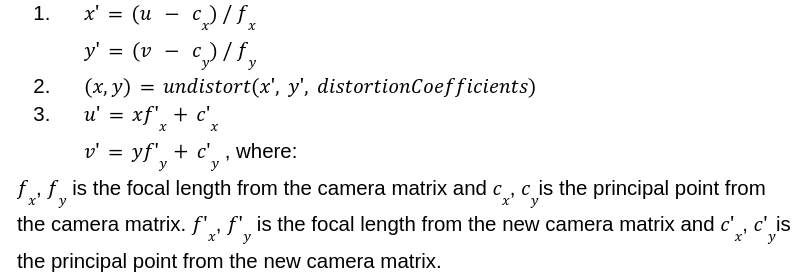
Detector parameters
This object is used to filter detections. This feature allows you to avoid false detections in problematic parts of the scene. It contains two keys:
detection_zones—an array of objects, where each object is used to define rules for detections.enabled—a boolean value that is intended to activate or deactivate the object.
Example of a defined object:
{
    "detector_parameters": {
        "detection_zones": [
            {
                "categories": [ "bicycle", "bus", "car", "heavy", "light",
                                "motorcycle", "pedestrian", "van" ],
                "enabled": true,
                "max_size": 999999,
                "min_confidence": 20,
                "min_size": 0,
                "version": 1,
                "zone": {
                    "points": [ [ 0, 0 ], [ 1, 0 ], [ 1, 1 ], [ 0, 1 ] ],
                    "type": "polygon"
                }
            },
            {
                "categories": [ "bicycle", "pedestrian", "unknown" ],
                "enabled": true,
                "max_size": 128,
                "min_confidence": 75,
                "min_size": 8,
                "version": 1,
                "zone": {
                    "points": [
                        [ 0.749671995639801, 0.27000001072883606 ],
                        [ 0.6428303122520447, 0.5879999995231628 ],
                        [ 0.24582941830158234, 0.49400001764297485 ],
                        [ 0.3717900514602661, 0.23800000548362732 ],
                        [ 0.749671995639801, 0.27000001072883606 ]
                    ],
                    "type": "polygon"
                }
            }
        ],
        "enabled": true,
        "version": 1
    }
}categories—an array of categories to be detectedmax_size—maximum detection size in pixelsmin_confidence—minimum detection confidence level reported as a percentage, which can take values in the interval <0; 100>min_size—minimum detection size in pixels.zone—an object defining the space in the camera image in which the rules will be applied. It contains an array of coordinatespoints, where a point is defined by an array [x, y]. These are normalized coordinates in the camera image, which can take values <0; 1>.
Georeferencing
An object that is used to georegistrate the image from the camera. It contains the following keys:
sensor_points—an array of points that are in the undistorted camera space (image after application of camera parameters), where a point is defined by an array [x, y]. These are normalized coordinates in the camera image, which can take values <0; 1>. If the camera parameters are not set or are disabled, then the undistorted space is equal to the raw camera output.wgs84_points—an array of points that are defined in map space (WGS84), where a point is defined by [longitude, latitude].- The points from
sensor_pointsandwgs84_pointsare matched with each other based on order. And both arrays must have the same number of points. enabled—a boolean value that is intended to activate or deactivate the object.
Since the sensor points for georeferencing are set in undistorted space, georeferencing should be set after the camera parameters are set. Alternatively, the georeference should be updated whenever the camera parameters are changed.
Example of a defined object:
{
    "georegistration": {
        "enabled": true,
        "sensor_points": [
            [ 0.3201183431952663, 0.394 ],
            [ 0.5415976331360947, 0.51 ],
            [ 0.684378698224852, 0.198 ],
            [ 0.5213609467455621, 0.14 ]
        ],
        "version": 1,
        "wgs84_points": [
            [ 61.2354, 45.6512 ],
            [ 61.2364, 45.6512 ],
            [ 61.2364, 45.6524 ],
            [ 61.2354, 45.6524 ]
        ]
    }
}
Input parameters
An object used to define parameters of an input video processing engine. It contains the following keys:
compute_tick—an integer number that specifies the interval in milliseconds at which new data is produced. It can take values in the interval <40; 2000>.connection_string—a string that defines the connection to the video source (mostly RTSP URI).detect_lp—a boolean value, where if set totrue, vehicle license plates will be detected.max_latency—an integer number that specifies the maximum latency, in milliseconds, after which new frames are discarded. When the latency between a frame’s timestamp and its decoding time reaches this threshold, the system will automatically drop frames to reduce the load. The default value is 300 ms. It can take values in the interval <50; +inf).max_processing_fps—a floating-point number that limits the process FPS. Extra frames are discarded after decoding. This configuration may cause fluctuations in processing FPS if the stream’s FPS is not an exact multiple of the processing FPS limit. Values less than 1 indicate that the process FPS limit is disabled. The default value is 0.protocol_type—a string that indicates the type of network protocol for communication with the source defined in theconnection_string. It can take the following values:tcp,udp.time_source—a string that specifies which time source will be used to timestamp the data. It can take the following values:pts_offset—at the beginning a time base is determined from the system time then the PTS time is added to each frame.current—the time of each frame is determined from the current system time at the moment of decoding.ntp—the time of each frame is decoded from the rtsp stream.
Example of a defined object:
{
    "input_parameters": {
        "compute_tick": 333,
        "connection_string": "rtsp://192.168.1.210/profile2/media.smp",
        "detect_lp": false,
        "max_latency": 300,
        "max_processing_fps": 0,
        "protocol_type": "tcp",
        "time_source": "ntp",
        "version": 3
    }
}
PTZ parameters
This object is used to define parameters related to PTZ cameras. It contains the following keys:
connection_string—a string that defines the connection to the PTZ camera.home_position—an object that allows you to set the home position of the PTZ camera. The camera will only evaluate data if it is in the set home position.enabled—a boolean value that is intended to activate or deactivate the object.
Example of a defined object:
{
    "ptz_parameters": {
        "connection_string": "name:[email protected]",
        "enabled": true,
        "home_position": {
            "enabled": true,
            "pan": 0.214,
            "pan_tolerance": 0.0010000000474974513,
            "tilt": 0.145,
            "tilt_tolerance": 0.0010000000474974513,
            "version": 1,
            "zoom": 0,
            "zoom_tolerance": 0.0010000000474974513
        },
        "version": 1
    }
}pan—a floating-point number that defines the home position of the horizontal movement (pan). It can take values in the interval <-1; +1>.pan_tolerance—a floating point number that defines the tolerance when comparing the current pan value with the home position. It can take values in the interval <0; +inf>.tilt—a floating-point number that defines the home position of the vertical movement (tilt). It can take values in the interval <-1; +1>.tilt_tolerance—a floating point number that defines the tolerance when comparing the currenttiltvalue with the home position. It can take values in the interval <0; +inf>.zoom—a floating-point number that defines the home position of the focal length (zoom). It can take values in the interval <0; +1>.zoom_tolerance—a floating point number that defines the tolerance when comparing the currentzoomvalue with the home position. It can take values in the interval <0; +inf>.
Visibility detection
An object that shows parameters for detecting scene visibility. It contains the following keys:
contrast_indicator_zone—an object that evaluates visibility based on contrast in a given part of the scene. During the evaluation period, a reference contrast is determined. From this value, a user-defined threshold (the maximum allowed downward change -max_negative_contrast_difference) is subtracted, defining the lower contrast limit for the current frame at which visibility is still considered sufficient.
If the current contrast is above this threshold, visibility is evaluated as good. If it falls below, visibility is considered compromised. The contrast zone should contain a static segment of the image with high contrast and minimal changes in lighting and appearance over time.trajectory_indicator_zone—an object that evaluates visibility based on the average length of trajectories in the scene area. Define a minimum average trajectory length of the objects within the trajectory zone and evaluation timeframe. If the average length of the trajectories detected during the evaluation timeframe is below the minimum average trajectory length, the contrast indicator is used to make a final decision on visibility. If the average length of the current trajectories is above the minimum average trajectory length, the reference brightness variability of the contrast indicator is updated to reflect the current conditions.enabled—a boolean value that is intended to activate or deactivate the visibility detection.
Example of a defined object:
{
    "visibility_detection": {
        "contrast_indicator_zone": {
            "evaluation_period": 30000,
            "max_negative_contrast_difference": 10,
            "version": 1,
            "zone": {
                "points": [
                    [ 0.840874969959259, 0.5839999914169312 ],
                    [ 0.5855000019073486, 0.612000048160553 ],
                    [ 0.6271249651908875, 0.3840000033378601 ],
                    [ 0.874625027179718, 0.3479999899864197 ],
                    [ 0.840874969959259, 0.5839999914169312 ]
                ],
                "type": "polygon"
            }
        },
        "enabled": true,
        "trajectory_indicator_zone": {
            "categories": [ "car", "van", "light" ],
            "evaluation_timeframe": 300000,
            "min_avg_trajectory_length": 100,
            "version": 1,
            "zone": {
                "points": [
                    [ 0.2941249907016754, 0.2639999985694885 ],
                    [ 0.2761249840259552, 0.5239999890327454 ],
                    [ 0.10175000131130219, 0.49800002574920654 ],
                    [ 0.11637499928474426, 0.23800000548362732 ],
                    [ 0.2941249907016754, 0.2639999985694885 ]
                ],
                "type": "polygon"
            }
        },
        "version": 1
    }
}
evaluation_period—an integer that specifies the size of the time window (in milliseconds) in which the contrast development is evaluated. The evaluation frequency is derived from this value as 1/5 of the evaluation period. It can take values in the interval <5000; +inf).max_negative_contrast_difference—a floating-point number that determines the maximum contrast drop between the current and reference contrast value. If the drop in the current contrast value is greater than this value, the visibility is considered poor. Otherwise, the visibility is good.categories—an array of categories from which the average length in the image zone is calculated.evaluation_timeframe—an integer that specifies the length of the time window in milliseconds. Trajectories that are enclosed in this time window are counted in the total average length of all trajectories whose positions must be in the observation zone. It can take values in the interval <10000; +inf).min_avg_trajectory_length—a floating-point number specifying the threshold for the minimum average length of trajectories in pixels.zone—an object defining the space in the camera image in which the evaluation of contrast or average trajectory length will be performed to determine the visibility state. It contains an array of coordinatespoints, where a point is defined by an array [x, y]. These are normalized coordinates in the camera image, which can take values <0; 1>.
Have some questions?[contact]
Updated over 1 year ago